Home Page

Amazing Core
Amazing Core is an open-source server emulator for Amazing World, an MMO originally developed by Ganz and shut down in 2018. This project provides a modular, configurable framework with a web-based admin dashboard, API-side asset tooling, and a TCP game server.
⚠️ Still in development - not yet in a playable state.
- No multiplayer, NPCs, or quests yet;
- Only the intro level and the empty Spring Bay map are accessible;
- Do not use your real username or password;
- Use any dummy username and password to log in;
But you can check out the work-in-progress prototype and join our community!

Download the game
You can install the latest published version with the following Steam link: Install
The game has its page on SteamDB, where you can also see additional information.
It is also possible to find an Android version on the internet.
Connect to the demo server
After installation, navigate to the game folder and open the ServerConfig.xml file in a text editor.
Modify the server address value as shown below:
ServerIP = 'springbay.amazingcore.org'
Now you can start the game.
- To play the intro level, click the
I'm new!button in the main menu; - To explore the Spring Bay, click the
Log inbutton and enter any username and password;
Host your own server
With your own server, you can access the admin dashboard to configure skins, maps, NPCs, and other features (work in progress)*.
Modify the server address value as shown below:
ServerIP = 'localhost'
Pre-compiled binaries
- Download the latest server release from the GitHub section.
- Extract the archive to a folder of your choice;
- Run the server binary;
Once started, it will download the blob.db file (~2 GB).*
When the download is finished, you can start the game.
- The API server will be available at http://localhost:3000
- Use
admin / adminto log in to the dashboard - The game server will listen on
localhost:8182
Configuration
You can customize server settings using the config.json file.
| Key | Description |
|---|---|
logger.level | Log verbosity: debug, debug+sql, info, warn, error |
logger.handler | Log format: pretty (colored, formatted), text, json |
servers.api | HTTP API bind address (e.g. localhost:3000) |
servers.game | TCP game server bind address (e.g. localhost:8182) |
settings.assetDeliveryURL | Base CDN URL sent to game clients |
settings.syncServerIP | Sync server IP sent in InitLocation responses |
settings.syncServerPort | Sync server port sent in InitLocation responses |
settings.brochat | Replace all outgoing chat messages with bro |
storage.blob.download | Auto-download blob.db on first start if missing |
storage.blob.url | URL to fetch blob.db from |
storage.databases.core | Path to core.db - main SQLite database |
storage.databases.blob | Path to blob.db - assets SQLite database |
storage.explorer | Enable the dashboard SQL explorer - only for testing! |
python.venv | Path to the managed Python virtual environment |
secure.auth.username | Dashboard admin username |
secure.auth.password | Dashboard admin password |
secure.session.key | Cookie session signing key |
secure.session.secure | Set Secure flag on session cookie (enable behind HTTPS) |
Running the game on macOS
The Steam version of the game is not compatible with Apple Silicon, but here is a patch.
-
Download the game using Steam.
-
Open the game folder by right-clicking the game in your Steam library and selecting Manage -> Browse local files.
-
Open the folder in terminal:
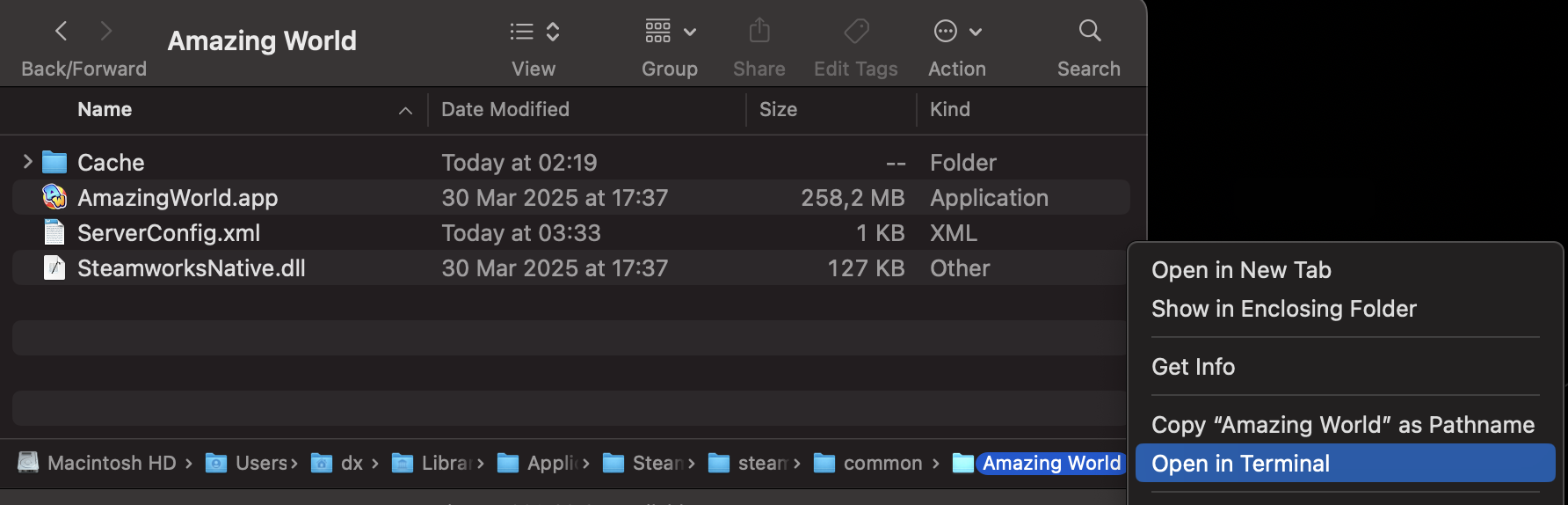
- Paste the following command into Terminal and press Enter.
curl -fsSL https://raw.githubusercontent.com/dv1x3r/amazing-core/master/tools/silicon.sh | bash
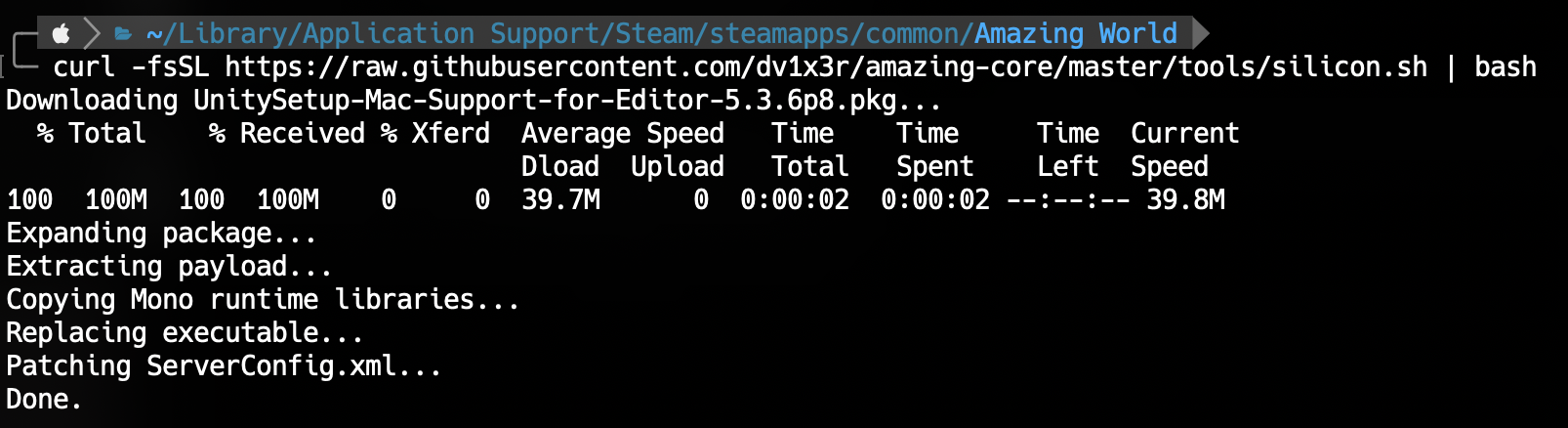
- Once the patcher has finished, you can launch the game normally!
You can also patch the game manually by following this guide.
License
This project is licensed under the GNU AGPL v3.
Amazing World™ is a registered trademark of Ganz. Amazing Core is an unofficial, fan-made project intended for personal and educational use only. It is not affiliated with or endorsed by Ganz or Amazing World™ in any way.
Cache Archive
Amazing World used Unity Streaming Assets, meaning things like images, audio, and asset bundles were stored on official servers and loaded by the game whenever they were needed. These files were also cached locally. Below is a list of known assets that have been found and shared by members of the community. Check out our Google Sheets for more details!
Loading cache list...
| No results. |
| Field | Value |
|---|---|
| No results. | |
| Type | Count |
|---|---|
| No results. | |
| Path | |
|---|---|
| No results. | |
Preview
Loading image...
Loading audio...
| File | Duration | Controls |
|---|---|---|
Loading file...
Loading archive...
Scene
Drag to rotate, right-click drag to pan, scroll to zoom. Some assets may not be centered.
Audio
| File | Duration | Controls |
|---|---|---|
| Loading... |
Images
| File | Image |
|---|---|
| Loading... |
Models
OID Calculator
A simple calculator for checking the OID (a unique object identifier) used by the game.
It is usually stored as a big int64 number, that can be sliced into specific groups of bits to get the Class, Type, Server and Object number.
[Class][Type][Server][Number...]
  8b     8b     8b       40b
- The
CDN IDis abase64representation ofGSF OID. - The
GSF OIDis anint64number that is sliced into specific groups of bits.
Build from source
Build using Go
To build the server from source, you will need Go 1.25 or newer:
make
# or
go build -o ./build/server ./cmd/server/main.go
To build and run with a single command:
make run
# or
go run ./cmd/server/main.go
You can choose between SQLite drivers by setting the CGO_ENABLED environment variable:
- Build with
CGO_ENABLED=0to usemodernc.org/sqlitedriver (default); - Build with
CGO_ENABLED=1to usegithub.com/mattn/go-sqlite3driver;
Folder structure
amazing-core/
├── cmd/
│   └── server/
│       └── main.go           - server entry point
├── data/
│   ├── cache.json            - asset metadata generated by cache-tool
│   └── sql/
│       ├── core_db/
│       │   ├── base.sql      - core.db base migration
│       │   └── updates/      - incremental migrations
│       ├── blob_db/
│       │   └── base.sql      - blob.db schema
│       └── queries/          - sql queries for admin dashboard explorer
├── internal/
│   ├── api/                  - http server for admin dashboard and asset streaming
│   │   └── services/         - admin/API service logic and asset/blob tooling
│   ├── game/                 - game server and gsf message handling
│   │   └── services/         - client-facing game logic and database access
│   ├── network/              - tcp server protocol implementation
│   ├── config/               - configuration variables
│   └── lib/                  - shared libraries (e.g. logging, helpers)
├── tools/                    - development tools (e.g. asset importers)
└── web/                      - embedded frontend for admin dashboard
Data and databases
The data/ directory contains .sql database migrations and a cache.json file with currently known asset files metadata.
SQLite Databases
For simplicity and portability, the project uses SQLite.
The data/sql/ directory is embedded into the server binary at compile time, and migrations are run automatically at startup.
core.db
Schema: data/sql/core_db/
The main SQLite database. Contains the classified list of available assets and random names used in the sign-up scene.
Managed by goose using migrations in data/sql/core_db/updates/. Shortcuts for creating, applying, and resetting migrations are available in the Makefile.
An initial squashed migration (data/sql/core_db/base.sql) includes both schema and seed data.
Use data/sql/core_db/squash.sh to squash update migrations into base.sql.
Files under data/sql/queries/ are named example SQL queries available to the admin dashboard`s SQL Explorer.
blob.db
Schema: data/sql/blob_db/
A separate SQLite database storing the raw binary content of game asset files.
Downloaded on startup if blob.download = true and the database is missing.
When a client requests /cdn/{cdnid}, the server fetches the blob column for that cdnid.
The database can be populated using the blob-tool or the admin dashboard.
Cache Metadata
cache.json
A summary of known cache files, including name (CDN ID), size, type, hash, GSF OID and basic bundle info (version, object counts, scene roots).
Generated with the cache tool Python script:
python tools/cache.py /path/to/cache/folder \
  --summary-file data/cache.json
This file is already included in the
core.dbbase migration. For future updates (if new unique cache assets are discovered), add a new migration underupdates/with the additional data.
Networking
Overview
The game client communicates with the server over a persistent TCP connection using a custom binary protocol. All data is serialized with the BitProtocol codec - a bit-level encoding scheme that compresses integers by encoding only the bytes that are actually needed.
The implementation lives in internal/network/
Wire Format
Every message follows this structure:
┌─────────────────────────────────────────────────────────┐
│  length prefix  │        payload bytes          │ 0x00  │
│  (varint)       │     (BitStream encoding)      │ (EOF) │
└─────────────────────────────────────────────────────────┘
Length prefix
The length prefix is a variable-length big-endian integer where the MSB of each byte signals whether more bytes follow:
Each group of 7 bits contributes to the value, MSB = continuation flag:
[1xxxxxxx] [1xxxxxxx] [1xxxxxxx] [0xxxxxxx]
 more bytes more bytes more bytes last byte
Payload
The payload is a BitStream - a sequence of bits packed into bytes. The stream is read and written bit-by-bit; byte boundaries are only respected for raw string/byte-array data (aligned reads/writes).
After the last payload byte comes a null terminator 0x00.
BitStream Encoding
Objects (nullable)
Objects begin with a null flag bit:
[0] -> object is not null
[1] -> null / not present
Booleans
A single bit: 1 = true, 0 = false.
Compressed integers (int16, int32, int64)
Integers are compressed using a variable-width encoding that minimizes bit usage for small values.
The encoding starts with a compressed flag bit:
[1] -> compressed (fewer than max bytes needed)
      followed by a count of how many bytes are needed
      [0]   -> 0 bytes -> value fits in 4 bits
      [10]  -> 1 byte  -> value is 1 byte  (8 bits)
      [110] -> 2 bytes -> value is 2 bytes (16 bits)
      ...
[0] -> full width (all bytes written)
Floating-point numbers (float32, float64)
Written as raw not compressed IEEE 754 bytes.
Strings
Strings are encoded as:
- A compressed
int32for the UTF-8 byte length. - The raw UTF-8 bytes, byte-aligned (any remaining bits in the current byte are skipped before writing).
Byte arrays
Same as strings: compressed length prefix followed by byte-aligned data.
Dates
Dates are encoded relative to a fixed epoch (0001-03-01).
A null flag bit precedes the value:
[1] -> zero time (null)
[0] -> seconds since epoch, written as a raw 8-byte integer
Message Structure
Every message has a header followed by an optional body. The outer wrapper adds a null flag for the entire message object.
[0]          -> message is not null
[header]     -> GSF header fields
[0]          -> body is not null
[body fields]
GSF Header
| Field | Type | Condition | Description |
|---|---|---|---|
flags | int32 | always | Bit flags |
svcClass | int32 | always | Message service class |
msgType | int32 | always | Message type for the given svcClass |
requestId | int32 | if IsService() | Correlates request/response pairs |
logCorrelator | string | if IsRequest() | Client-side correlation string |
resultCode | int32 | if IsResponse() | Result code (0 = success) |
appCode | int32 | if IsResponse() | Application-level error code |
appString | string | if appCode != 0 | Error description string |
appCodes | array | if appCode == 17 | Extended error code list |
Flag semantics:
| Bit | Meaning |
|---|---|
flags & 2 == 0 | IsService - a request/response pair |
flags & 1 != 0 | IsResponse (only when IsService) |
flags & 2 != 0 | IsNotify - fire-and-forget notification |
flags & 16 != 0 | IsDiscardable |
Annotated Example
The very first message the client sends after connecting is a GetClientVersionInfo request. It is 22 bytes total:
hex: 15 20 c2 5c 04 6d 0c 0c 18 41 6d 61 7a 69 6e 67 57 6f 72 6c 64 00
Breakdown:
| Bytes | Value | Meaning |
|---|---|---|
15 | 21 | Length prefix: payload is 21 bytes |
20 c2 5c 04 6d 0c 0c 18 | bit stream | Header + body |
41 6d 61 7a 69 6e 67 57 6f 72 6c 64 | AmazingWorld | String content (byte-aligned) |
00 | 0 | Null terminator |
Bit-by-bit payload decoding:
Bit  8:  [0]                -> message is not null
Bit  9:  [0]                -> header is not null
Bit 10:  [1][0]             -> flags compressed, 0 bytes -> 4-bit value
Bit 14:  [0000]             -> flags = 0
Bit 16:  [1][1][0]          -> svcClass compressed, 1 byte follows
Bit 19:  [00010010]         -> svcClass = 18 (USER_SERVER)
Bit 27:  [1][1][1][0]       -> msgType compressed, 2 bytes follow
Bit 31:  [0000001000110110] -> msgType = 566 (GET_CLIENT_VERSION_INFO)
Bit 47:  [1][0]             -> requestId compressed, 0 bytes -> 4-bit value
Bit 51:  [0001]             -> requestId = 1
Bit 53:  [1][0]             -> logCorrelator length compressed, 0 bytes -> 4-bit value
Bit 57:  [0000]             -> length = 0 (empty string)
Bit 59:  [0]                -> body is not null
Bit 60:  [1][1][0]          -> clientName length compressed, 1 byte follows
Bit 63:  [00001100]         -> length = 12 (bytes in "AmazingWorld")
Bit 71:  [0] align          -> skip to byte boundary
Bits 72–167:                -> "AmazingWorld" (12 bytes, 96 bits)
Go Implementation
Reading a message
// 1. Read framing length from buffered reader
length, err := codec.ReadLength(stream)

// 2. Read 'length' bytes into data buffer
data := make([]byte, length)
io.ReadFull(stream, data)

// 3. Create a BitReader over the raw bytes
reader := bitprotocol.NewBitReader(data)

// 4. Parse the header
header, err := gsf.ReadHeader(reader)

// 5. Look up the handler
handler, ok := router.Lookup(header.SvcClass, header.MsgType)

// 6. Build request and response objects
conn := &gsf.Connection{remoteIP: remoteAddr}
req := gsf.NewRequest(ctx, header, reader, conn)
res := gsf.NewResponse(header, writer)

// 7. Call the handler
handler(res, req)
Implementing a handler
func GetClientVersionInfo(w gsf.ResponseWriter, r *gsf.Request) error {
    // Decode the request body
    req := &messages.GetClientVersionInfoRequest{}
    if err := r.Read(req); err != nil {
        return err
    }

    // Build and send the response
    res := &messages.GetClientVersionInfoResponse{
        ClientVersionInfo: "133852.true",
    }
    return w.Write(res)
}
Defining a message type
Request and response structs implement gsf.Deserializable and gsf.Serializable:
type GetClientVersionInfoRequest struct {
    ClientName string
}

func (req *GetClientVersionInfoRequest) Deserialize(reader gsf.ProtocolReader) {
    req.ClientName = reader.ReadString()
}

type GetClientVersionInfoResponse struct {
    ClientVersionInfo string
}

func (res *GetClientVersionInfoResponse) Serialize(writer gsf.ProtocolWriter) {
    writer.WriteString(res.ClientVersionInfo)
}
Collection helpers
The gsf package provides generic helpers for encoding and decoding slices, maps, and nullable values:
// Slices: int32 length prefix (−1 = nil), then elements
gsf.ReadSlice(reader, func() MyType { ... })
gsf.WriteSlice(writer, slice, func(v MyType) { ... })

// Maps: int32 length prefix (−1 = nil), then string key + value pairs
gsf.ReadMap(reader, func() MyType { ... })
gsf.WriteMap(writer, dict, func(v MyType) { ... })

// Nullable objects: bool null flag + optional value
gsf.ReadNullable(reader, func() MyType { ... })
gsf.WriteNullable(writer, value, func(v MyType) { ... })
Game decompilation
Assembly-CSharp
The game is built using Unity engine. The latest version of the game was compiled with Unity 5.3.6f1.
Most of the game’s core logic is contained in the Assembly-CSharp.dll file.
This DLL may be decompiled, modified, and reassembled using common .NET tools such as:
ILSpy: primary decompiler, successfully decompiles nearly all code without issues;dnSpy: used for edge cases where ILSpy fails (in this project, only a single file required it);
This should be done for educational purposes only.
Source reference
pkg.go.dev
Amazing Core keeps its detailed handler, message, and GSF object reference in Godoc comments.
Message handlers
document the internal/game handler methods. Use this page to understand when the client calls a handler and what server workflow the handler coordinates.
Game services
document the internal/game/services methods used by handlers for client-facing database reads, writes, and DTO assembly.
Admin API services
document the internal/api/services methods used by the dashboard routes for grid/form data, asset imports, blob tools, and other admin workflows.
Message payloads
document internal/network/gsf/messages. Use this page for request, response, and notification payload structs. These comments should focus on the wire message and confirmed client behavior.
GSF object types
document internal/network/gsf/types. Use this page for reusable objects nested inside messages, such as players, avatars, assets, items, zones, OIDs, and enum values.
Unreleased versions
Public pkg.go.dev can show an exact unreleased commit only through a Go pseudo-version.
Resolve a branch to a pseudo-version with:
go list -m github.com/dv1x3r/amazing-core@dev
Then open:
https://pkg.go.dev/github.com/dv1x3r/amazing-core@<pseudo-version>
QA Tools Menu
The game contains a hidden QA tools menu that can be enabled through ServerConfig.xml.
- Navigate to the game folder and open the
ServerConfig.xmlfile in a text editor. - Add a
Versionattribute to the config:
Version = '1.8'
After launching the game with this flag enabled, press F3 to open the QA tools menu.
F2 also should open a related QA layout, but it probably requires an additional UI file.
How It Works
The Version attribute is obfuscated, and is not treated as a normal version number.
The client decodes it as an encoded options flag in GameSettings.cs:748.
- Parse the value as a float.
- Multiply it by 10.
- Round it to an integer.
- If the result is divisible by 9, accept it as a valid options code.
- Divide it by 10 and interpret the result as a bitmask.
Bitmask Values
The decoded bitmask controls three flags:
1 -> debuggingEnabled
2 -> skipIntro
4 -> showVersion
In practice, valid values are:
1.8 -> debug enabled
2.7 -> skip intro
3.6 -> debug enabled + skip intro
4.5 -> show version
5.4 -> debug enabled + show version
6.3 -> skip intro + show version
7.2 -> debug enabled + skip intro + show version